
Game Design: Build a Fun Game with Scratch
Course description
- Ages 7+
- Beginner – advanced
- Flexible Schedule Group Lessons
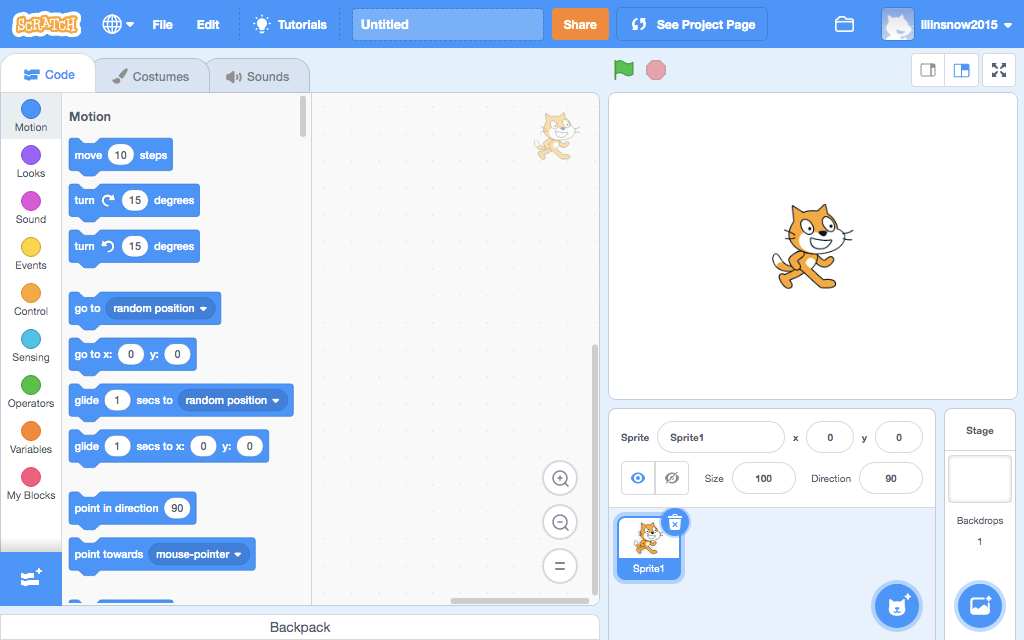
Your child loves playing video games and wishes to make a game, but doesn’t know where to start? Scratch is the perfect tool to get started! Learn the fundamentals of coding with visual coding. With us, a game idea becomes a reality. Gamers get ready to be amazed!

Requirements
No previous programming experience needed for this course. Your only requirement is having all the materials listed in our supply list before the course begins and the ability to follow instructions and be creative.

Flex Work
This course follows a flexible schedule. Scheduled video chats are recorded if you miss the live session. We stay in touch through email. This works great for the child that is able to work independently and sometimes doesn’t want to be on live video chat.

Time Commitment
This course is a flexible schedule. You can purchase one month or multiple months. Each month is a different project. Maximum of one live call per week, and work is to be reviewed on the following week. The instructor and students complete the project at the end of the week and feedback is sent by email if necessary.
How does it work?
Description
One Month Long course
This class introduces programming using basic block-based coding with visual drag and drop SCRATCH programming.
This is a program that teaches children how to learn programming in a fun and easy way by seeing how different elements of their code animates their creations on screen.
After learning what each code block does, the child has an opportunity to get creative and add their ideas. Students will go from basic learner to game developer in no time.
Requirements:
This course is based on Scratch, a product created by MIT engineers to teach kids how to program. This is an open source free program available online at www.scratch.mit.edu. There is nothing to install in your computer, you just need to create an account with Scratch.
Please review the materials list below prior to starting the course.
This class is intended for beginners or advanced students. The only prerequisite is the ability to follow instructions and be able to work independently. An adult present or available when they are working on the assignment is not required but recommended in case the student needs some extra help or encounters technical difficulties with their computer.
This is an introduction course to game developing. The goal is to be creative and have FUN!
Class Schedule:
Monthly Course
Week 1: Introduction Exercise
Week 2: One Character Movement
Week 3: Multiple Characters Interaction
Week 4: Final Game Design Scene
This is an monthly course where a basic game scene is created by the end of the month. It is intended for those who can follow instructions and work at their own pace with a goal in mind. A live video session introducing the lesson of the week is done at the beginning of the week and recorded for those that can’t make the live session. The work of the month will be split into various faces.
Week 1 – Introduction to Scratch and practice exercise to get to know the app
Week 2 – Design your own character and learn to upload already designed characters and start creating the first program to make the character move
Week 3 – Create a storyboard to have multiple characters interaction and learn how to program with multiple elements on the screen.
Week 4 – Final Game Design, putting together the characters and the interactions along with the background design and details.
Month Long Course
One Month (4 Live Meetings)
Flexible Schedule work
Teacher Expertise
Industrial and Systems Engineer turned Robotics Teacher and FLL Competitions Coach
I have been involved teaching Robotics and going to Robotics competitions with First Lego League Organization for over 6 years. I started my career in Engineering as a Sales Engineer and then went into Systems Improvement as a web architect designing websites and working with computer programmers to develop software products. I continue to work in Engineering as a Freelancer, but I also dedicate time to the future engineers and teach robotics and programming basics. I focus on making science and math fun for kids. With my education and teaching experience at a Montessori School and other local public schools, I find Robotics the perfect tool to bring creativity to math and science education.
Register Today!
This class is very popular! Space is limited! Act NOW!
1 monthClass Duration | 2 to 5 KidsClass Size |
7 – 9Age Range | $97 TotalPrice per Learner (USD) |
Supply List
Scratch Account
An active account in Scratch is required for this course. Your account has to be created and tested before the first day of class.
Visit Scratch at https://scratch.mit.edu/ and create an account by going into “Join Scratch”.

Host System
Students must have a good internet connection to stream Zoom Calls and be able to watch Videos Online and have the necessary for accessing Scratch online. This may be a tablet, PC or Mac. Review the requirements at https://scratch.mit.edu/info/faq.
Teacher
Over 10 years of experience in Engineering
Graduated from Florida International University with an Industrial and Systems Engineering Degree and from University of Florida with an Advertising Degree.
Elementary School Teaching and Coaching Experience
Started teaching education with Montessori Education and continue to grow as a teacher in Robotics by teaching students at local schools in aftercare programs and in-school Robotics programs. Also participated in Robotics Competitions with First Lego League Florida and France.
Multilingual
Native English and Spanish speaker, now also teaching Robotics in French.

What Parents Say

My 8 year old son loves Legos. Thanks to this class, he is now also passionate about robotics! The activities on offer were varied, and my son loved them all very much. The teacher is very educational.
Cecile Guillaumont
Parent of student Winter 2019
Thanks a lot for this week of discovery. Boys were overexcited to tell their father what they learned!
Elsa Galland
Parent of two student partipants
Jules enjoyed this course.
Jean Christophe Deloye
Parent of student Summer 2019
Questions?
Contact us and let us know how we can help you. Ask us any questions or concerns you may have.