
Junior Coding – with Lego Software
Learn Basic Programming through Lego WeDo 2.0 software at the comfort of your home.

Requirements
No previous programming experience needed for this course. Your only requirement is having all the materials listed in our supply list before the course begins and the ability to follow instructions and be creative. Be aware that the Lego Education Kit is required to participate on the building part of this course, but it’s not mandatory.

Weekly Zoom Class
This course follows a weekly scheduled Zoom Call class format. There are no video recordings or make-up classes. The interaction is through Zoom Meetings. This works great as an extracurricular guided activity online at the comfort of your own home.

Time Commitment
This course is once a week schedule of a total of 4 weeks. No make-up classes. The instructor will present the information weekly and a small project will be completed each class. There is no mandatory homework, all work is completed during the class. To participate in the building of the Robot, the child must have the Lego Education Kit available during class.
How does it work?
Description
4 week course
This class introduces programming using basic block-based coding with visual drag and drop Lego Education WeDo 2.0 programming software.
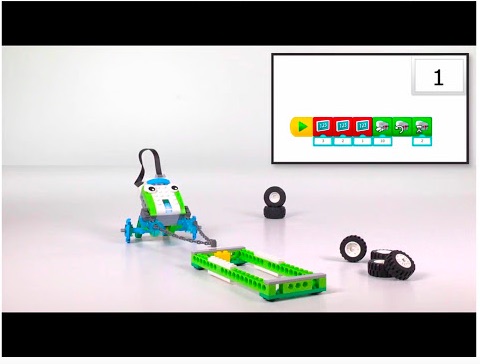
This is a program that teaches children how to learn programming in a fun way seeing how different elements of their code affects an actual model made out of LEGOS. The robot is built by the instructor and integrated with a low-energy Bluetooth Smarthub that connects to a tablet, laptop or desktop to run programs we create together. The child is not obligated to have the Lego Kit to build the actual robot, but he is welcomed to buy the kit for this class to build along with the teacher. The child will be able to program along with the teacher and then see the teacher’s Robot move with the program created together in class.
After learning what each code block does, the child has an opportunity to get creative and add their own sounds, record their own voice and practice engineering design by seeing the program tested by the teacher during class and receive feedback on their program ideas. Students will go from basic learner to programmer after completing their first assignment.
Requirements:
This course is based on the Lego Education WeDo 2.0 Kit. The Kit is not required for completing the course, but you will need to download the software for the WeDo 2.0 on a PC, Mac or tablet. You can find the software installation at the Lego Education website under resources.
Please review the materials list below for downloading the software needed prior to starting the course.
This class is intended for beginners Ages 7 – 10. The only prerequisite is the ability to follow instructions and be able to work together with the teacher to give suggestions on the program. An adult present or available when they are working on the assignment is not required but recommended in case the student has technical difficulties with the Lego Software.
This is an introduction course to programming and building the Robot is not obligated. The teacher will build the robot in class and the students can see the process if they do not have the Lego Kit themselves. The goal is to understand the basics of programming and learn how different elements of coding affect different functions in the robot.
Class Schedule:
4 week course
Class 1: What is coding and how does Lego WeDo work?
Class 2: WeDo 2.0 Programming Basics First Program
Class 3: Exploring Science Concepts and simulating what we learned using a Robot.
Class 4: Programming Sensors in Lego WeDo
This is a course intended for those who can follow instructions and work together with the teacher with a goal in mind. A Zoom Meeting is scheduled weekly introducing a new lesson each week along with resource videos explaining a science concept and then building a robot to explain what we learned. The work of the month will be split into various projects.
1 Month Course
Once a Week (Total of 4 weeks)
Zoom Meeting Schedule Call Weekly
Teacher Expertise
Industrial and Systems Engineer turned Robotics Teacher and FLL Competitions Coach
I have been involved teaching Robotics and going to Robotics competitions with First Lego League Organization for about 4 years. I started my career in Engineering as a Sales Engineer and then went into Systems Improvement as a web architect designing websites and working with computer programmers to develop software products. I continue to work in Engineering, by I also dedicate time to the future of education. My focus now has been to make science and math education fun. With my education and teaching experience on Montessori, I find Legos the perfect tool to bring creativity to STEM programs.
Register Today!
This class is very popular! Space is limited! Act NOW!
4 weeksClass Duration | 1-10 KidsClass Size |
7 – 10Age Range | $197 TotalPrice per Learner (USD) |
Supply List
LEGO Education WeDo 2.0 Software
The WeDo 2.0 Software is required for this course. We will be focusing on programming only.
Go to Lego Education website and download the WeDo 2.0 Software for your device before class starts. Make sure you open the program and test it out to make sure that it is all working.
Lego Education WeDo 2.0 Download – https://education.lego.com/en-us/downloads/wedo-2/software

Host System
Students must have a system that is compatible with the WeDo 2.0 software. This may be a tablet, PC or Mac. Review the requirements at the Lego Education System Requirement Page: https://education.lego.com/en-us/support/wedo-2/system-requirements
Questions?
Contact us and let us know how we can help you. Ask us any questions or concerns you may have.